
7 Day Azores Itinerary: Google Sheets Template
Matt - August 17, 2023
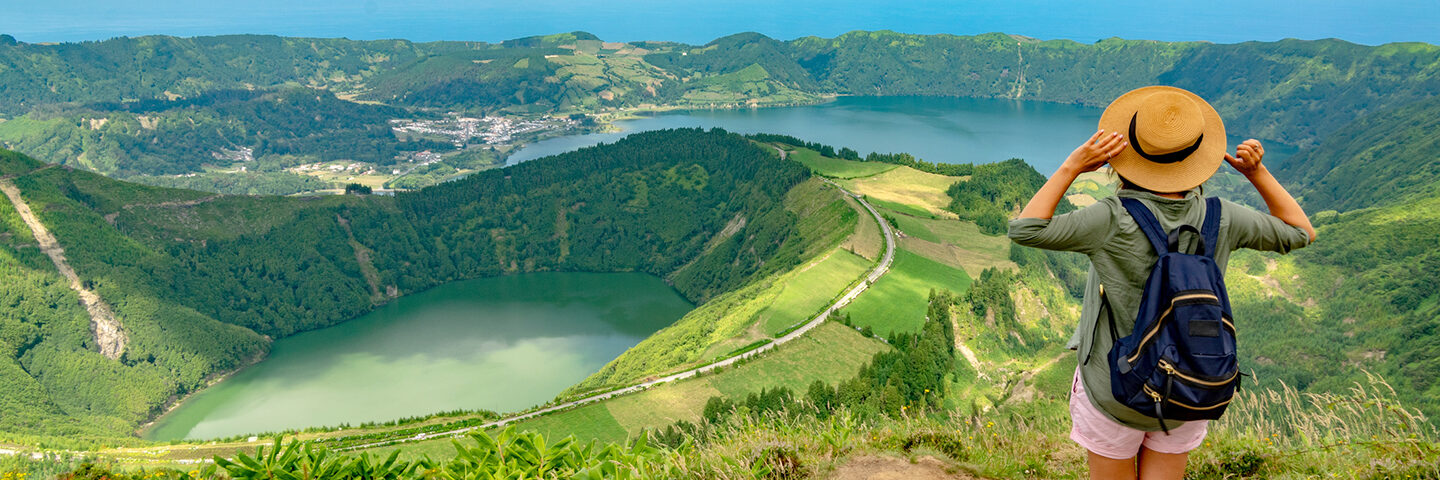
Use this 7 day Azores itinerary to plan a first trip across São Miguel, Faial, and Pico without starting from scratch. The route gives you the working plan first: island bases, transfer days, lodging, activities, official links, weather-flex ideas, costs, notes, and map-ready stops you can adjust as the trip takes shape.
Make a copy of the Azores Google Sheets itinerary template. Add your travel dates and lodging, then keep extra hikes, restaurants, viewpoints, and backup activities as flexible options until you know what fits.
The itinerary template is free to use in Google Sheets. When you want map-based planning tools, install Travel Mapper for Google Sheets to try the full add-on feature set for 7 days, including map view, Google Maps autofill, drag-and-drop itinerary editing, itinerary email, and Google My Maps export. If you do not subscribe after the trial, you can still keep using the basic Google Sheets template.

What this Azores itinerary template includes
- A 7 day Azores itinerary organized around São Miguel first, then Faial and a Pico day trip.
- A practical transfer structure that uses an inter-island flight for São Miguel to Faial and the Horta-Madalena ferry for Pico.
- Unscheduled ideas to consider for weather-dependent hikes, thermal pools, restaurants, viewpoints, and backup plans.
- Official planning links for airports, Azores Airlines, Atlânticoline ferries, Azores Trails, Capelinhos, Pico vineyard culture, and Mount Pico reservations.
- An Azores checklist for rental cars, ferries, flights, thermal pools, whale watching, weather, offline maps, and travel documents.
- A shared-cost tracker for lodging deposits, rental cars, ferries, inter-island flights, tours, thermal pools, dinners, fuel, and transfers.
The useful part is that real travel options stay close to the plan. If Lagoa do Fogo, Poça da Dona Beija, Gruta das Torres, or an extra restaurant is still just a possibility, leave it flexible until it earns a spot in the trip.
Quick route summary
This route is built for travelers who want one week in the Azores with more than one island, but not so much movement that the trip becomes a transport puzzle.
Days 1-3 use Ponta Delgada as the São Miguel base, with one western day around Sete Cidades and Ferraria, and one eastern day around Furnas. Day 4 flies from Ponta Delgada to Horta on Faial. Day 5 stays on Faial for Caldeira, Capelinhos, and whale watching. Day 6 uses the ferry from Horta to Madalena for a Pico day trip. Day 7 keeps the return to São Miguel or onward departure light.
That gives the itinerary a useful rhythm: three São Miguel days, two Faial days, one Pico day, and a buffer-conscious departure day. If your flights are tight or you dislike island transfers, you can simplify this into a São Miguel-only week and save the Faial and Pico ideas for another trip.

Day 1: Arrive in São Miguel and settle into Ponta Delgada
Start with an easy arrival day in Ponta Delgada. Land at João Paulo II Airport, get settled at your lodging, take a waterfront walk, visit Igreja Matriz de São Sebastião, and keep dinner simple.

Do not overbuild the first day. If you are landing from the mainland, the U.S., Canada, or another island connection, the most useful thing you can do is get your car or transfer sorted, add your hotel address, and let the rest of the trip start from where you are actually staying.
Keep practical details close to the plan: confirmation numbers, parking notes, check-in windows, and anything your group needs to know before the first full day. This is also a good place to track rental-car pickup and drop-off timing if you are not keeping it in a separate booking app.
Day 2: Sete Cidades, Ferraria, and the west side of São Miguel
The second day goes west because Sete Cidades and Ponta da Ferraria fit naturally into the same area of the island. Start with Vista do Rei and the Sete Cidades viewpoints while the weather is good, then decide how much walking you actually want.
Use the official Azores Trails page for Vista do Rei to Sete Cidades if you are considering the hike, but you do not have to do the full trail. Many travelers will be happier using the morning for viewpoints, the village, the lakeside area, and a flexible lunch near Sete Cidades or Mosteiros.
In the afternoon, Ponta da Ferraria is the natural west-side follow-up. Visit Azores describes it as a bathing site with thermal water springs, but this stop depends on tide, weather, sea state, and your comfort level, so keep a nearby backup plan for conditions that do not suit bathing.

Mosteiros sunset is a good optional finish if the day is clear and you still have energy. If clouds roll in or the drive feels long, return to Ponta Delgada and save the evening for dinner.
Day 3: Furnas, thermal pools, and Lagoa das Furnas
Day 3 moves east to Furnas. Use Terra Nostra Park as the main anchor, then leave room for cozido, Lagoa das Furnas, and an easier return to Ponta Delgada.
Terra Nostra Park is useful as the day's anchor because it combines gardens and a thermal pool in one place. Pack a swimsuit and a darker towel or swimsuit if you care about mineral-water staining, and confirm opening details before you make the whole day depend on it.
For lunch, choose a cozido restaurant in Furnas once you know the timing that works for your group. Choose the place and timing that fit your group, then keep the reservation link and notes with the meal once it is real.
The afternoon uses Lagoa das Furnas as the flexible piece. The official Azores Trails page for Lagoa das Furnas lists the circular route as roughly 3 hours, which is helpful context before you decide whether to do the full loop or just use the lake area and viewpoints.

Keep the evening light. This is the last São Miguel night before moving to Faial, so it is better to settle rental-car timing, pack, and confirm the inter-island flight than force another far-flung dinner.
Day 4: Fly from São Miguel to Faial and settle into Horta
For a realistic one-week trip, plan on an inter-island flight from Ponta Delgada to Horta.
Use Azores Airlines / SATA for the current inter-island schedule, and confirm the Horta airport details before locking hotels or rental cars. The official Horta Airport destination page lists Ponta Delgada and SATA Air Açores among its flight and airline information, which is the kind of source you want close to this transfer day.

Once you reach Horta, keep the afternoon simple: check into lodging, walk the marina, see the sailor murals, and use Porto Pim or Monte da Guia as the flexible scenic stop if the weather is clear.
This is one of the places where a simple list can trick you. A flight, hotel check-in, car pickup, lunch, marina walk, viewpoint, and dinner can look straightforward in prose, but the day only works if the timing still feels realistic once you place everything in order.
Day 5: Faial Caldeira, Capelinhos, and whale watching
Day 5 stays on Faial. Start with Caldeira if the weather is clear. The official Azores Trails page for Caldeira on Faial notes that the route is best in good weather and visibility, so it belongs near the morning while you still have options.
The next anchor is the Capelinhos Volcano Interpretation Centre. The official park page explains that the centre covers the Capelinhos eruption, the formation of the archipelago, volcanic landscapes, and the lighthouse setting. Check hours before the trip, then keep any ticket or timing notes with your plan.
Whale watching fits the afternoon if operators and sea conditions cooperate. Keep it visible in the itinerary but give yourself a backup dinner or viewpoint option in case weather changes the tour plan.

If you want a slower trip, this is the day to trim. Choose between Caldeira plus Capelinhos or whale watching plus Horta time, depending on the weather and your interests.
Day 6: Ferry to Pico for vineyards, Madalena, and mountain views
Day 6 uses the ferry from Horta on Faial to Madalena on Pico. Keep the Atlânticoline timetable handy and check the actual schedule for your date before you commit to the Pico day.
The day is built around Madalena and the Pico vineyard landscape, which fit well with the ferry schedule. The Landscape of the Pico Island Vineyard Culture Interpretation Centre is tied to a UNESCO-listed cultural landscape and is a better fit for a one-day Pico visit.

Mount Pico is a weather-dependent full-day plan that needs its own reservation, early start, and recovery time. If you want to climb, use the official Mount Pico reservation page, build the hike as its own day, and do not bury it inside a casual afternoon plan. It is the sort of plan that needs a reservation, conditions check, early start, and enough recovery time.
Return to Horta by ferry in the evening. Once both ferry legs are in the plan, dinner timing and transfer risk become much easier to judge.
Day 7: Keep the departure day conservative
The final day is intentionally light. If you need to get from Horta back to Ponta Delgada before an onward flight, keep the rest of that day open for the transfer.
Leave room for weather and island transfers on the final day. When flights, ferries, rental cars, and international departures are all involved, a clean final day is usually better than one more ambitious stop.
If your flight schedule gives you a real buffer in Ponta Delgada, use it for a simple lunch, souvenirs, or a short walk. If not, keep those ideas optional and let the airport plan stay calm.
Optional Azores stops to keep in the itinerary
The Azores template includes extra ideas to keep flexible: Lagoa do Fogo, Caldeira Velha, Ribeira dos Caldeirões, Poça da Dona Beija, Gruta das Torres, Mount Pico summit climb, and extra restaurants for Ponta Delgada, Horta, or Madalena.
They are not optional because they are unimportant. They are optional because they should stay flexible until the weather, ferry times, flight times, and group energy are clearer.
This is also where Travel Mapper's Chrome Extension can help during research. If you are comparing restaurants, hikes, viewpoints, ferry pages, Tripadvisor listings, Google Maps places, or travel blogs, the Travel Mapper Chrome Extension can help you save promising places as you find them. Keep them flexible until the plan is ready.
How to customize this Azores itinerary
First, add your real lodging addresses. São Miguel, Faial, and Pico planning changes quickly depending on where you sleep and where you pick up a car.
Next, replace the sample dates with your own travel dates. Lock in confirmed flights, ferries, lodging, rental cars, whale watching, and thermal pools first. Let weather-dependent hikes, extra restaurants, viewpoints, and backup activities stay flexible until you know where they fit.
Then add official links and confirmation details. The itinerary already includes links for airports, Azores Airlines, Atlânticoline, Azores Trails, Capelinhos, Pico vineyard culture, and Mount Pico reservations. Add your own booking links and notes as you reserve each piece.
Finally, track shared costs if you are traveling with other people. Azores trips often include shared rental cars, fuel, ferry tickets, lodging deposits, tours, meals, and thermal pool entries. Keeping those costs beside the itinerary makes them easier to review and settle.
How Travel Mapper helps after you copy the itinerary
The Google Sheets itinerary is the planning base. Travel Mapper adds the map layer when you want to see your Azores stops together before you lock in each day.
When your lodging base, crater viewpoints, thermal pools, ferry terminals, and airport are on the same map, awkward day grouping is easier to spot before you commit to bookings. Use Travel Mapper to keep that map context right inside your planner while you fine tune the itinerary.
As the plan changes, you can use Google Maps autofill to add place details, adjust the day with drag-and-drop itinerary editing, email an itinerary summary for easier during-trip reference, export places to Google My Maps, and keep shared costs in the same planner.
If you are planning a broader trip with several stops, the same workflow also fits the multi-city trip planning guide. For a more general reusable planner, start with the free Google Sheets travel planner template. If you want another island-heavy example, compare this with the 7 day New Zealand itinerary or the 14 day Japan itinerary template.
Azores itinerary FAQ
This section covers the common planning questions people usually have before they adapt the itinerary for their own trip.
Is 7 days enough for the Azores?
Seven days is enough for a first Azores itinerary if you are realistic about island movement. This template covers São Miguel, Faial, and a Pico day trip, but it does not try to see all nine islands.
If you want a slower trip, make the week São Miguel-only or choose São Miguel plus Faial. If you want to visit more islands, extend the trip so each transfer and island has enough time.
Should I visit one island or multiple islands in one week?
Choose one island if you want the simplest trip and the most weather flexibility. Choose multiple islands if you specifically want island-hopping and are willing to plan flights, ferries, lodging changes, and transfer buffers.
Should I fly or take ferries between islands?
For this itinerary, plan to fly between São Miguel and Faial, then use the ferry between Faial and Pico. Check Azores Airlines / SATA for current inter-island flights and Atlânticoline for current ferry timetables.
Do not assume every island pair works like a short shuttle. Check the official schedule links, then build the day around the real departure times.
Can I use the Azores template without installing Travel Mapper?
Yes. You can copy and use the Google Sheets itinerary for free. It still works for dates, times, places, notes, links, costs, checklist items, and shared expenses.
Travel Mapper is the upgrade when you want map-based itinerary planning inside Google Sheets: seeing your itinerary on a map, using Google Maps autofill, adjusting the order with drag-and-drop editing, emailing the itinerary, or exporting places to Google My Maps.
Does Travel Mapper automatically optimize an Azores route?
No. Travel Mapper helps you see your itinerary on a map and adjust the plan, but it does not draw connected route lines or automatically optimize every stop for you.
You still decide what matters: a clear-weather viewpoint, a ferry time, a thermal pool booking, a slower lunch, or a lighter evening. The map gives you context so those decisions are easier to make.
Where should I put restaurants or backup activities?
Keep them in the main itinerary with your planned stops, but do not assign a day or time until you are ready. That keeps real options close to the plan without making them look confirmed.
For the Azores, this is especially useful for weather-dependent stops. Keep Lagoa do Fogo, extra thermal pools, restaurants, hikes, and Pico backup ideas visible, then move the right ones into the dated plan when the forecast and transfer timing are clearer.